


Tours that survive a real page navigation
A common failure point for simpler tooltip libraries: a full page navigation mid-tour. Introwiz is built to survive it.
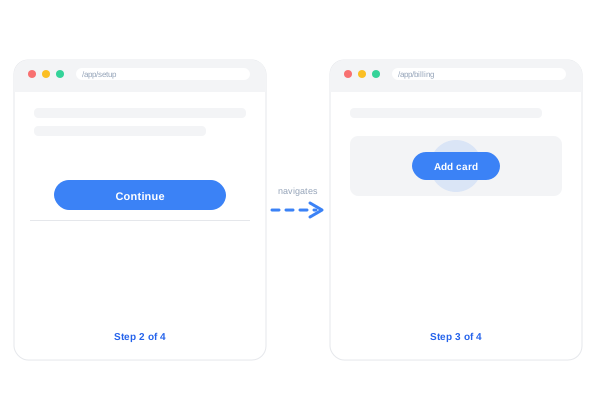
Plenty of onboarding widgets can highlight a button on a single screen. Far fewer can guide someone through a flow that spans several pages — a signup wizard, a billing setup, a multi-step import — without losing track of where the user is.
How it works
- Recording persists its state across page loads. Walk from
/app/setupto/app/billingto/app/teamin one continuous recording session, and Introwiz keeps capturing steps the whole way. - Playback resumes automatically on the next page. When a step causes a navigation, the Tutorial Engine picks the tour back up as soon as the next target element is available.
- A waiting indicator is shown while the next page — and its target element — finishes loading, so the tour never looks broken mid-navigation.
Where this matters most
Multi-page tours are the difference between a tour that only covers a single dashboard widget and one that can actually onboard someone through your product’s real setup flow — connecting a billing method, inviting a teammate, configuring an integration — end to end.
More features
Stop writing manuals. Start recording tours.
Start your free trialRecord your product once, publish an interactive walkthrough your users actually finish. Free trial, card required, cancel anytime.